
PICK YOUR AI THEME TO GET STARTED

MCP SERVERS
An MCP server is a connection to another system you use — for example a booking, stock or CRM system — that your chatbots can ask for live information. You add it once on the MCP SERVERS tab, then choose which chatbots may use it.
BEFORE YOU START
- Find the MCP server address and its token in your other system's settings, or ask its provider.
- Not every system offers an MCP server. If you can't find one, its provider can tell you.
ADD THE SERVER
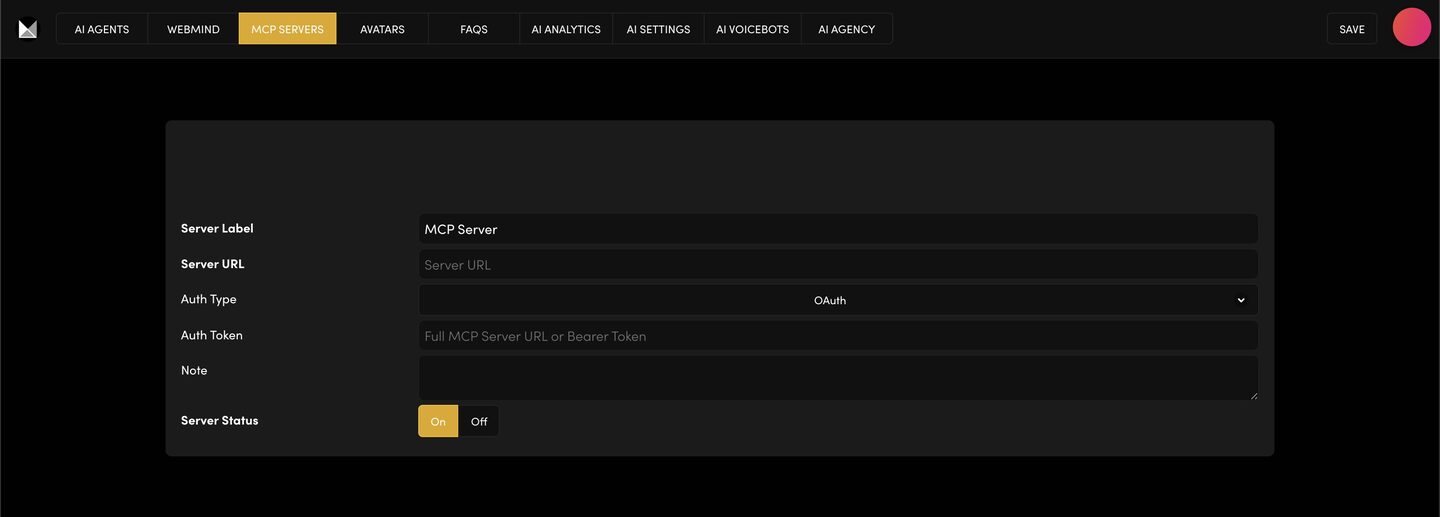
- In AI Agents, open the MCP SERVERS tab and click ADD MCP SERVER.
- Server Label — a name you will recognise later, for example "Bookings".
- Server URL — the server address from your other system.
- Auth Type — how the server checks it's allowed in, for example OAuth.
- Auth Token — the full MCP Server URL or Bearer Token your other system gives you.
- Note — a reminder of what it's for.
- Server Status — On.
Press SAVE.
CONNECT IT TO A CHATBOT
- Open the AI AGENTS tab and edit the chatbot that should use it.
- Scroll to MCP Servers and, under MCP Connections, select your server.
- Press SAVE.
Only the chatbots you pick can use the server.
TEST IT
In that chatbot's preview, ask something only your other system could answer.
No answer? Check the Server Status is On, the URL and token were copied exactly, and the server is picked on the chatbot and saved. Still stuck? Contact the MOBLE team.
KEEP IT SAFE
Type the token only into the Auth Token field. Never paste it in an email or a chat. To stop a server being used, set its Server Status to Off and press SAVE.
RELATED HELP

Play before you Pay?
GETTING AROUND
SUPPORT
AI SALES LINE
AI SUPPORT LINE
ENQUIRIES
team@moble.com.au
GET A QUOTE
A Web Builder for Design. A CMS for Business. We serve all businesses from SME's to Enterprise. Talk with us for AI development, custom website design, website development, ecommerce websites, directories, intranets and social networks.
PRIVACY | WEBSITE TERMS | PLATFORM TERMS | © 2026 MOBLE PTY LTD