
PICK YOUR AI THEME TO GET STARTED

MOBLE LEADS→ WHATSAPP AI SALES AGENT
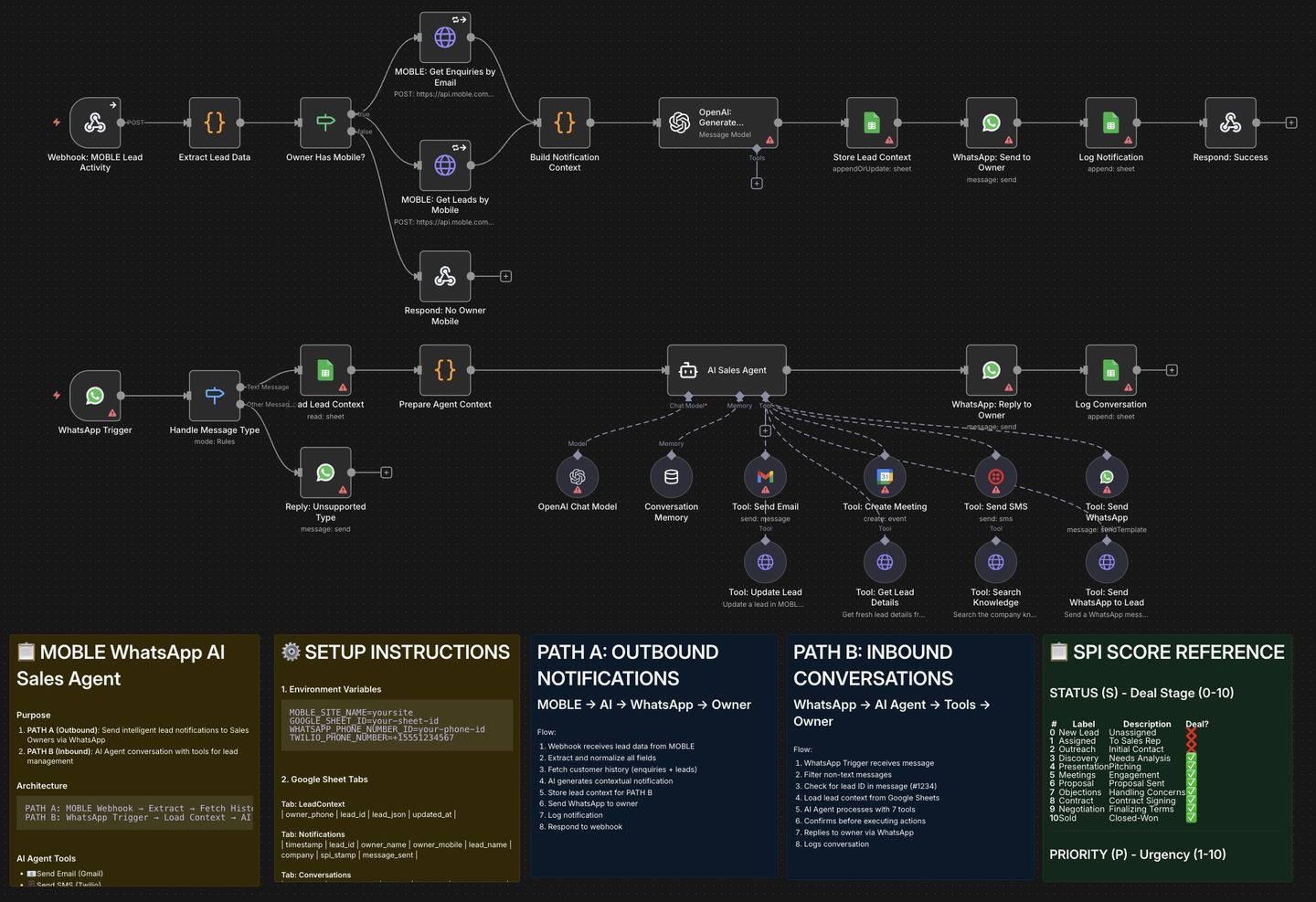
Create instant notifications to your Sales Team with a Summary of the Sale, the SPI Score, and an WhatsApp AI Agent waiting to deliver your next task
Run 1 notifies the lead owner with the new lead. Run 1 let's the lead own immediately repspond to the customer via an AI Sales Agent with the MOBLE Knowledge Base and tools for Gmail, Calendar, SMS and WhatsApp.
DOWNLOADS
This workflow gives Sales Owners a two-way WhatsApp assistant connected to MOBLE → Leads:
- PATH A (Outbound): When a Lead is created/updated in MOBLE, n8n sends an AI-crafted WhatsApp notification to the Lead Owner (owner name/mobile from MOBLE).
- PATH B (Inbound): The Owner replies on WhatsApp and chats with an AI Agent that can send Email/SMS/WhatsApp to the lead, create meetings, update SPI/status in MOBLE, and search your knowledge base.
- n8n (cloud or self-hosted)
- MOBLE account with API key
- Meta Business Account (WhatsApp Business Platform)
- Google Workspace (Gmail, Calendar, Sheets)
- Twilio account with SMS-enabled number
- OpenAI API key
In AI Agents → AI Integrations, click the Help icon next to WhatsApp AI Agent to download:
- MOBLE Leads → WhatsApp (AI Agent) n8n workflow (.json)
- Sync Log Google Sheet (template)
In n8n Settings → Environment Variables add:
- MOBLE_SITE_NAME = your subdomain (no .moble.site)
- GOOGLE_SHEET_ID = ID from your Sync/Context Sheet URL
- WHATSAPP_PHONE_NUMBER_ID = from Meta WhatsApp setup
- TWILIO_PHONE_NUMBER = your Twilio number with country code (e.g. +15551234567)
Create one Google Sheet with three tabs (exact names/headers):
- LeadContext: owner_phone | lead_id | lead_json | updated_at
- Notifications: timestamp | lead_id | owner_name | owner_mobile | lead_name | company | spi_stamp | message_sent
- Conversations: timestamp | owner_phone | lead_id | direction | user_message | agent_response
Add your credentials to each node.
- MOBLE API (HTTP Header Auth)
Name: Authorization | Value: Bearer ak_XXXXXXXXXXXXXXXX - WhatsApp Business Cloud: Access Token, Business Account ID, Phone Number ID
- OpenAI: API Key
- Gmail OAuth2, Google Calendar OAuth2, Google Sheets OAuth2
- Twilio: Account SID & Auth Token
- Create a Meta app (type: Business) and add the WhatsApp product.
- Get Phone Number ID, Business Account ID, and a Permanent Access Token.
- Webhook for PATH B: Activate the workflow, copy the Webhook URL from the WhatsApp Trigger node, then in Meta → WhatsApp → Configuration set: Callback URL = n8n webhook, Verify Token = any string (e.g. moble_verify_token), subscribe to messages.
- Import the workflow JSON. Open each node and assign credentials: MOBLE API to all MOBLE HTTP nodes; WhatsApp to WhatsApp nodes; Gmail, Calendar, Sheets, Twilio, OpenAI respectively.
- Save.
- In n8n, open Webhook: MOBLE Lead Activity, copy the URL.
- In MOBLE → Agents → [Your Agent] → Edit → Integrations, paste this URL into the n8n Webhook field for Leads. Save.
- Toggle workflow to Active.
- Test PATH A: Send a POST to the webhook with a sample payload (Lead + Enquiry). Owner should receive a WhatsApp notification.
- Test PATH B: From the Owner’s phone, message your WhatsApp business number: “What’s the status?”, “Schedule a meeting tomorrow 2pm”, “Send intro email”, etc.
Email via Gmail, SMS via Twilio, WhatsApp to Lead, WhatsApp Template, Create Meeting (Calendar), Update Lead (status/priority/importance), Get Lead Details, Search Knowledge.
STATUS (S) - Deal Stage (0-10)
0 - New Lead - Unassigned
1 - Assigned - To Sales Rep
2 - Outreach - Initial Contact
3 Discovery - Needs Analysis
4 - Presentation - Pitching
5 - Meetings - Engagement
6 - Proposal - Proposal Sent
7 - Objections - Handling Concerns
8 - Contract - Contract Signing
9 - Negotiation - Finalizing Terms
10 - Sold - Closed/Won
PRIORITY (P) - Urgency (1-10)
10 - Now or Never - Pay TODAY
9 - Closing Window - Fast-moving deal
8 - Final Stages - Near completion
7 - Active Decision - Considering options
6 - Ongoing - Nurturing steadily
5 - Progressing - Strategic follow-ups
4 - Keeping Warm - Touchpoint required
3 - Future Potential - Low urgency
2 - Long-Term - Relationship building
1 - Dormant - Unlikely to convert
IMPORTANCE (I) - Pipeline Impact (1-10)
10 - Game Changer - Transforms results
9 - Major Win - High revenue impact
8 - Key Account - Substantial value
7 - Strong - Meaningful deal
6 - Consistent - Decent opportunity
5 - Reliable Sale - Steady business
4 - Good Addition - Worth pursuing
3 - Minor Impact - Small deal
2 - Filler Sale - Minimal value
1 - Low-Stakes - Insignificant
- WhatsApp not sending: Check Phone Number ID, Access Token, and E.164 phone formats.
- Webhook silent: Confirm URL pasted in MOBLE and workflow is Active; review n8n execution logs.
- AI not responding: Verify OpenAI key/credits; Sheets credential access to the Sheet ID; tabs named exactly.
- Templates failing: Ensure Meta template name, language, and parameters match the approved template.
SECURITY: Restrict access to n8n and Sheets. Rotate MOBLE/OpenAI tokens. Remove credentials when staff leave.
RELATED HELP


Play before you Pay?
GETTING AROUND
SUPPORT
AI SALES LINE
AI SUPPORT LINE
ENQUIRIES
team@moble.com.au
GET A QUOTE
A Web Builder for Design. A CMS for Business. We serve all businesses from SME's to Enterprise. Talk with us for AI development, custom website design, website development, ecommerce websites, directories, intranets and social networks.
PRIVACY | WEBSITE TERMS | PLATFORM TERMS | © 2026 MOBLE PTY LTD