
PICK YOUR AI THEME TO GET STARTED

OUTBOUND:
MOBLE LEADS→ CRM
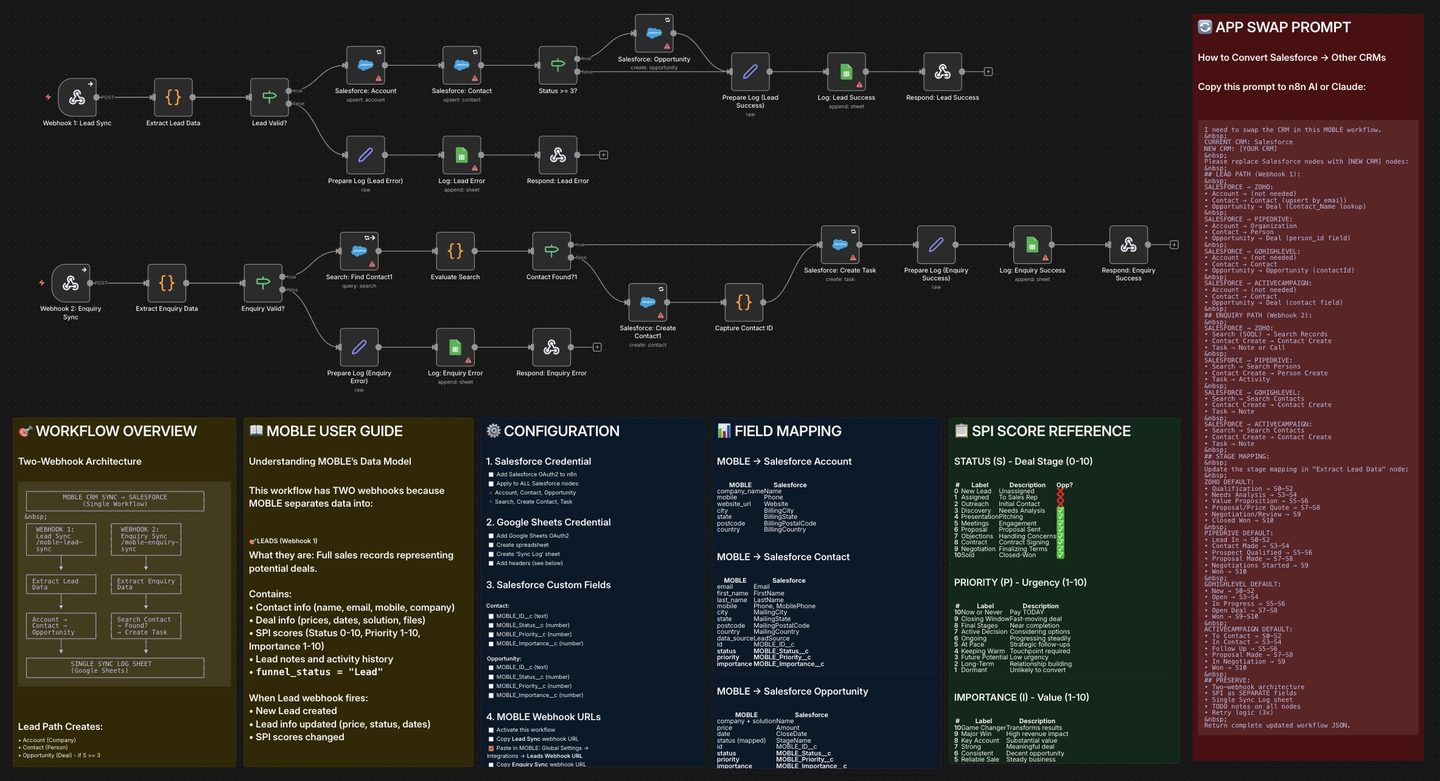
Sync MOBLE Leads and Enquiries to your CRM (Salesforce, HubSpot, Pipedrive, Zoho, GoHighLevel) via n8n—two webhooks, SPI as separate fields, and a single Google Sheets Sync Log.
MOBLE Webhooks (Leads + Enquiries)
→ n8n (validate, match contact, map SPI)
→ CRM Nodes (Account/Contact/Opportunity; Enquiries → Task)
→ Google Sheets (single Sync Log).
DOWNLOADS
Sync MOBLE Leads → Salesforce using a two-webhook design that mirrors how MOBLE separates core Lead data from ongoing Enquiries. The Lead webhook creates/updates Account, Contact, and (when Status ≥ 3) an Opportunity.
The Enquiry webhook turns each touchpoint (SMS/WhatsApp/Chatbot/Form/Email/Call) into a Salesforce Task on the right Contact—aligned with the right-hand Enquiries Log in MOBLE. :contentReference[oaicite:0]{index=0}
SPI (Status 0–10, Priority 1–10, Importance 1–10) is sent as separate fields for clean reporting and filters. A single Google Sheets Sync Log records successes and errors for both webhooks.
Why two webhooks?
MOBLE separates a Lead into two living parts in the Lead UI:
- Lead Info (left side): the core record—contact details, pricing/quotes, key dates, file URLs, notes, tags, and SPI (Status, Priority, Importance). When these change, you’re updating the Lead itself.
- Enquiries Log (right side): the rolling conversation history. It automatically collects all touchpoints linked to the Lead Contact’s email/phone and company domain—chatbot transcripts, form submissions, emails, WhatsApp/SMS, and call notes. For example, if the Lead Contact is alex@acmecompany.com, the Enquiries Log will also group messages from any teammate using @acmecompany.com, keeping the whole account narrative in one thread.
To mirror this model in your CRM, the workflow uses two webhooks:
- Webhook 1 — Lead Sync: fires on new/updated Lead data (contact, pricing, dates, files, notes, SPI). It creates/updates CRM records such as Account/Company, Contact, and (from a chosen Status threshold) Opportunity/Deal.
- Webhook 2 — Enquiry Sync: fires on every touchpoint (chatbot, form, email, WhatsApp/SMS, call). Each event is written to the CRM as an Activity/Task on the correct Contact, preserving the same “Enquiries Log” view your team sees in MOBLE.
Download the n8n Workflow Template above. Or alternatively, in MOBLE → AI Agents → AI Integrations, click the Help icon next to Salesforce to download:
- n8n Workflow: MOBLE Leads → Salesforce
- Sync Log Google Sheet template
Also available on this page (same setup pattern):
- n8n Workflow: MOBLE Leads → HubSpot
- n8n Workflow: MOBLE Leads → Pipedrive
- n8n Workflow: MOBLE Leads → ActiveCampaign
- n8n Workflow: MOBLE Leads → Zoho CRM
- n8n Workflow: MOBLE Leads → GoHighLevel
Tip: All CRM variant templates retain the two-webhook architecture (Lead + Enquiry) and single Sync Log pattern.
Activate the workflow to reveal two webhook URLs:
1) Lead Sync — creates/updates Account, Contact, and Opportunity (when Status ≥ 3)
2) Enquiry Sync — creates a Task on the Contact for each touchpoint (SMS/WhatsApp/Email/Form)
Paste the URLs in Settings → Integrations:
Leads Webhook: Lead Sync URL
Enquiries Webhook: Enquiry Sync URL
(You’ll also see the same fields under Add Knowledge → AI Integrations.)
1) Import the n8n Workflow
- In n8n: Create Workflow → Import from File and load MOBLE Enquiries + Leads → Salesforce (.json).
- Leave Inactive until you finish credentials + webhooks.
2) Credentials (attach once, reuse everywhere)
- Salesforce OAuth2 — apply to all Salesforce nodes: Account, Contact, Opportunity, Search/Upsert, Create Contact, Task.
- Google Sheets OAuth2 — attach to the Log nodes (Lead/Enquiry Success + Error).
- MOBLE API (Header Auth) — Name:
Authorization, Value:Bearer ak_XXXXXXXXXXXXXXXX(use on any MOBLE HTTP nodes, if present).
3) Salesforce custom fields for SPI (recommended)
- Contact: MOBLE_Status__c (number), MOBLE_Priority__c (number), MOBLE_Importance__c (number), MOBLE_ID__c (text)
- Opportunity: MOBLE_Status__c (number), MOBLE_Priority__c (number), MOBLE_Importance__c (number), MOBLE_ID__c (text)
- Map the three SPI numbers directly—do not combine into one string.
4) Stage mapping (Status → Salesforce StageName)
- Default mapping inside the workflow:
S0–S2 → Prospecting
S3–S4 → Qualification
S5–S6 → Needs Analysis
S7 → Proposal/Price Quote
S8–S9 → Negotiation/Review
S10 → Closed Won - Update the mapping in the Extract Lead Data Code node if your pipeline uses different stage names.
5) Sync Log (single sheet for both webhooks)
- Attach Google Sheets OAuth2 to each Log node and select the same spreadsheet with a sheet named Sync Log.
- Typical headers (auto-appended): timestamp, workflow, webhook, source_id, sync_type, status, spi_score, moble_status, moble_priority, moble_importance, account_id, contact_id, opportunity_id, task_id, activity_type, email, error_message, notes.
MOBLE logs all touchpoints as Enquiries. In each Lead (also Tickets/Tasks), the right-side Enquiries Log shows every Enquiry from the same email and the same company domain (e.g., @acme.com). The Enquiry webhook mirrors this: each message becomes a Salesforce Task on the matching Contact, so CRM activity stays aligned with conversation history in MOBLE.
Each workflow includes an APP SWAP sticky note with a ready-made prompt you can paste into n8n AI to replace Salesforce nodes with another CRM (Zoho, Pipedrive, GoHighLevel, ActiveCampaign, HubSpot). It preserves the two-webhook architecture, SPI as separate fields, and the single Sync Log—updates code nodes too.
- 401/403: Re-check Salesforce OAuth on all nodes; confirm n8n webhook URLs are public and workflow is Active.
- No Opportunity created: Status < 3. Raise Status or adjust stage mapping.
- No Task on Enquiry: Verify Enquiry webhook URL in MOBLE. Ensure email/phone/domain can locate the Contact; the workflow creates a Contact when none found.
- No Sync Log rows: Attach Google Sheets OAuth and select the correct spreadsheet and Sync Log sheet.
SECURITY: Restrict n8n access; rotate API keys; remove credentials when staff leave.
RELATED HELP



Play before you Pay?
GETTING AROUND
SUPPORT
AI SALES LINE
AI SUPPORT LINE
ENQUIRIES
team@moble.com.au
GET A QUOTE
A Web Builder for Design. A CMS for Business. We serve all businesses from SME's to Enterprise. Talk with us for AI development, custom website design, website development, ecommerce websites, directories, intranets and social networks.
PRIVACY | WEBSITE TERMS | PLATFORM TERMS | © 2026 MOBLE PTY LTD