
PICK YOUR AI THEME TO GET STARTED

ADD KNOWLEDGE:
LEADS → MOBLE
Import leads from Google Sheets (or Airtable) into MOBLE, auto-apply SPI scoring (Status, Priority, Importance) with AI, and route each lead to the next step — Discovery, Proposal, Checkout, or Onboarding.
Source Sheet (Google Sheets or Airtable) → n8n Workflow → MOBLE Leads API → MOBLE Leads Board → MOBLE Knowledge Base (SPI/AI fields) → Google Sheets (Sync Log)
DOWNLOADS
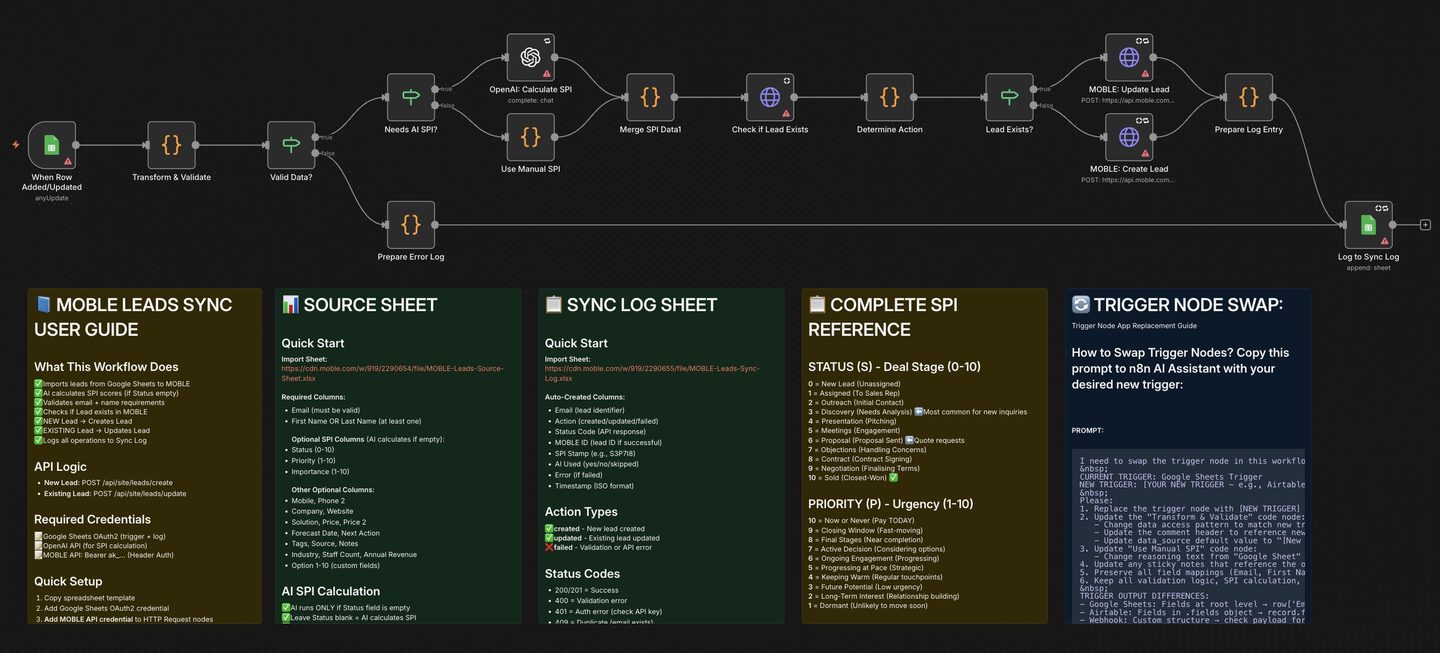
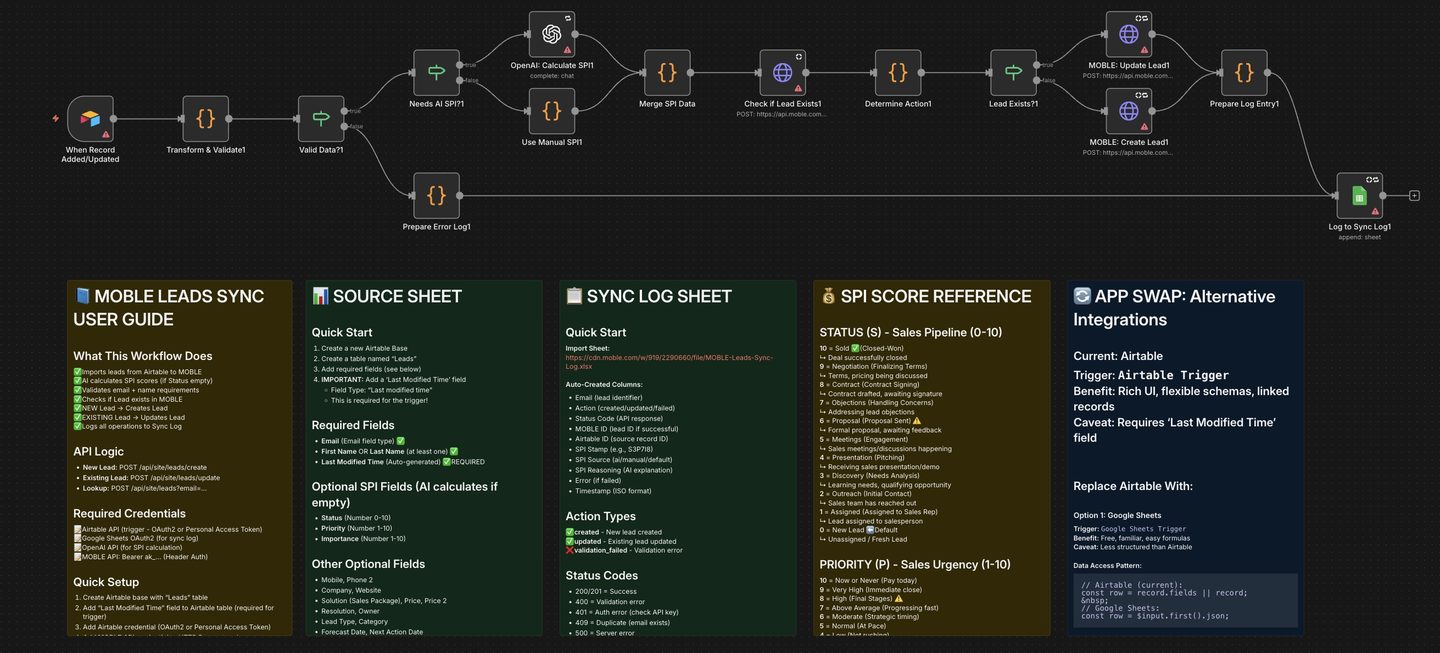
Use a shared Google Sheet or Airtable Base as your live lead list. When rows/records are added or updated, n8n validates the data, checks if the lead already exists in MOBLE → Leads, then either creates or updates that Lead. Each workflow optionally runs an AI node to set the SPI Score (Status, Priority, Importance), and logs results to a Google Sheets Sync Log. HTTP Request nodes include: Check if Lead Exists → Create Lead → Update Lead.
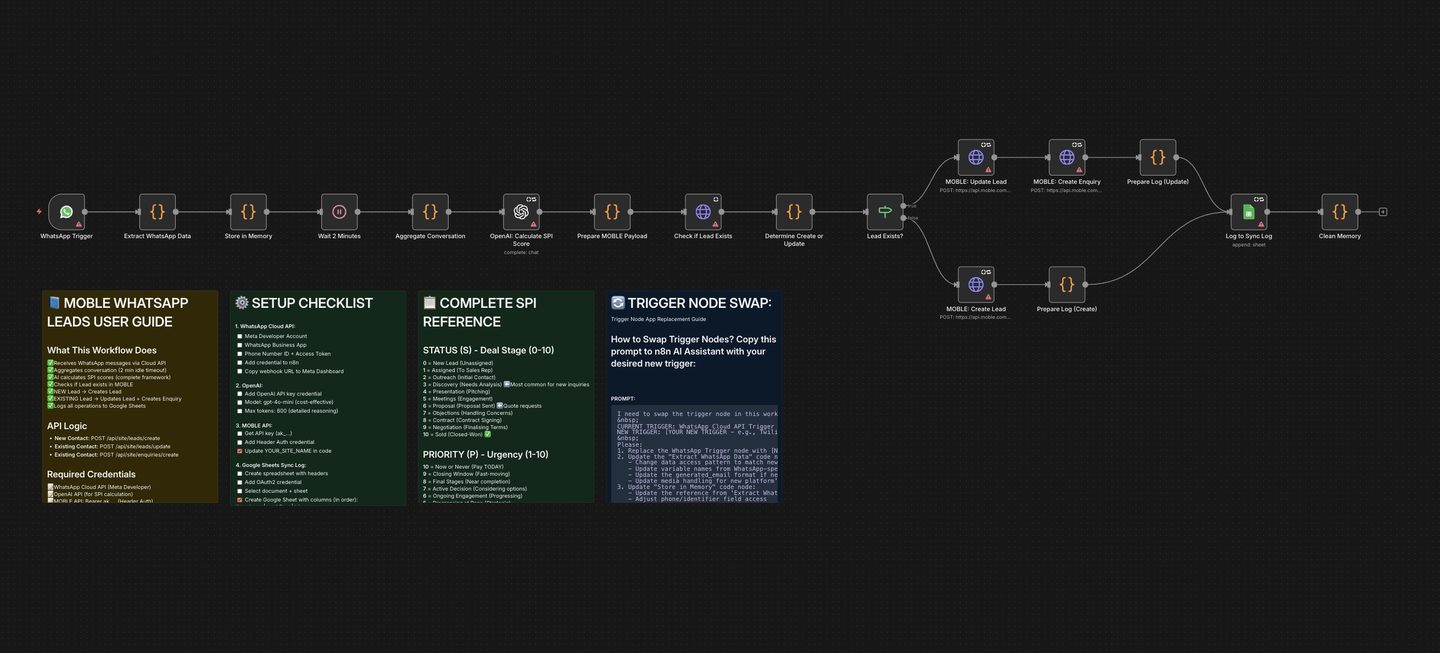
For WhatsApp, new conversations are captured, SPI-scored, and routed to MOBLE Leads. If the contact already exists, the workflow updates the Lead and also creates a new Enquiry so the message thread appears in the Lead’s right-hand Enquiries Log in MOBLE.
- Routes & nodes (Airtable & Google Sheets variants): Lookup:
POST /api/site/leads→ New:POST /api/site/leads/create→ Existing:POST /api/site/leads/update. - WhatsApp variant: New Lead →
/leads/create; Existing Lead →/leads/updateand/enquiries/createto populate the Enquiries Log.
There are three workflows on this page: Google Sheets → MOBLE Leads, Airtable → MOBLE Leads, and WhatsApp → MOBLE Leads (+ Enquiries). All include an optional AI SPI node so your outreach can run hands-free.
1. Create Your Source (Google Sheets or Airtable)
- Create two documents/tabs with these exact names (you can rename later, just mirror names in n8n):
- MOBLE-Leads-Source-Sheet — tab: Leads
- MOBLE-Leads-Sync-Log — tab: Sync Log
- Populate Leads with at least: Email (required) and First Name or Last Name (one required). The AI node can set SPI if Status is blank.
- Airtable tip: add a “Last Modified Time” field for the trigger.
2. Import the n8n Workflows
- In n8n → Create Workflow → Import from File:
- Google Sheets → MOBLE Leads — CSV/Sheet source → MOBLE Leads
- Airtable → MOBLE Leads — Airtable trigger → MOBLE Leads
- WhatsApp → MOBLE Leads — WhatsApp Cloud API → MOBLE Leads (+ Enquiry for existing).
- Workflows open Inactive — keep them inactive until credentials and sheet/base names are set.
3. Add Trigger Node Credentials
Google Sheets Trigger
- Open When Row Added or Updated and attach Google Sheets OAuth2. Document: MOBLE-Leads-Source-Sheet, Sheet: Leads.
Airtable Trigger
- Attach OAuth2/PAT and select your Base + Leads table. Set Last Modified Time as the trigger field.
WhatsApp Inbound (Cloud API)
- Connect your WhatsApp Business App credentials (Phone Number ID + Access Token) and add the webhook URL in Meta.
4. Add MOBLE API Credentials (All HTTP Request Nodes)
- In MOBLE: Settings → Integrations → MOBLE API Key. Copy your key (starts with
ak_). - In n8n, open every MOBLE HTTP Request node (e.g., Check if Lead Exists, Create Lead, Update Lead, and for WhatsApp also Create Enquiry) and set a Header credential:
- Name: Authorization
- Value: Bearer
ak_XXXXXXXXXXXXXXXX
5. Configure the AI SPI Node (Optional)
- Add your OpenAI (or preferred LLM) credential to the SPI node. The node analyses lead data (Sheets/Airtable) or the WhatsApp transcript, then returns
status,priority,importanceand a stamp likeS3P6I7. - Leave Status blank to trigger AI SPI; if you set Status manually, the AI path is skipped.
6. Add Google Sheets Sync Log Credentials
- Open Log to Sync Log and attach Google Sheets OAuth2. Document: MOBLE-Leads-Sync-Log, Sheet: Sync Log. The log records action, status, SPI, IDs, and errors for audit.
7. Test, Then Activate
- Run Execute Workflow in n8n with a test row/record or a WhatsApp message. Confirm a new or updated Lead in MOBLE and check the Sync Log for a “success” entry with SPI fields.
When a WhatsApp message starts a new conversation, the workflow builds a Lead payload and SPI scores it. If the contact already exists as a Lead in MOBLE, the workflow updates the Lead and creates an Enquiry so the message thread shows in the Lead’s Enquiries Log (right sidebar). If it’s a brand-new contact, a new Lead is created; subsequent messages will continue to log as Enquiries for that Lead.
Each workflow includes a TRIGGER NODE APP SWAP sticky note. Copy the provided prompt from the trigger node, paste it into n8n AI, and state the new app you wish to use (e.g., Twilio, Slack, Telegram, Webhook). n8n AI will replace the trigger and update code nodes automatically (so you don’t need to touch JavaScript). This pattern is built into the WhatsApp workflow and documents how to map fields (IDs, text, media) for other platforms.
- Email — required
- First Name, Last Name — one required
- Phone — optional
- Company / Organisation — optional
- Role / Title — optional
- Source
- Campaign / Tag
- Notes
- Status / Priority / Importance (optional if using AI SPI)
- SPI Score (AI will set if blank)
- AI Summary / AI Tags
- UTM Source, UTM Medium, UTM Campaign
Leave Status blank to let the AI SPI node score automatically (Airtable/Sheets variants).
- Captures timestamp, action (created/updated/validation), status, HTTP status code, Lead/Enquiry IDs (if any), SPI stamp/source/reasoning, and error messages.
- Nothing syncing: Ensure the workflow is Active and only one source trigger is enabled.
- 401/403: MOBLE API key missing/invalid. Header must be Authorization: Bearer ak_XXXXXXXX on all MOBLE HTTP nodes (lookup/create/update and WhatsApp enquiry).
- 409: Lead already exists — the workflow will auto-route to Update.
- No Sync Log: Confirm the Google Sheets credential and names: MOBLE-Leads-Sync-Log / Sync Log.
- AI not scoring: Check LLM credentials and that the SPI prompt mapping is intact; Status must be blank to trigger AI in the Sheets/Airtable workflows.
SECURITY: Restrict n8n and Source access; rotate MOBLE and LLM keys; remove credentials when staff leave.
The workflow aggregates a short WhatsApp conversation (2-minute idle window), then AI-scores the transcript and pushes into MOBLE. New Lead → Create Lead. Existing Lead → Update Lead and Create Enquiry so the thread appears in the Enquiries Log. The same Sync Log structure tracks outcomes and SPI reasoning.
RELATED HELP


Play before you Pay?
GETTING AROUND
SUPPORT
AI SALES LINE
AI SUPPORT LINE
ENQUIRIES
team@moble.com.au
GET A QUOTE
A Web Builder for Design. A CMS for Business. We serve all businesses from SME's to Enterprise. Talk with us for AI development, custom website design, website development, ecommerce websites, directories, intranets and social networks.
PRIVACY | WEBSITE TERMS | PLATFORM TERMS | © 2026 MOBLE PTY LTD